


A QI measurement plan sets out what you will measure, how each measure is defined, who will collect the data and how the team will review it. It...
3 months ago

When improvement teams are trying to understand a problem, one of the most important questions they can ask is:
Which causes are contributing most to the issue we are trying to improve?
Pareto charts help answer that question by making patterns visible. They show which causes occur most frequently, helping teams focus improvement efforts where they are most likely to have the greatest impact.
Traditionally, creating a Pareto chart has often involved exporting data into spreadsheets, manually categorising information, and building charts outside the systems where improvement work is taking place.
Simana makes this process simpler by allowing teams to create and use Pareto charts directly within their improvement workflow.
Why Use Pareto Charts Within Simana?
The value of a Pareto chart comes from helping teams make better decisions about where to focus. When the analysis is disconnected from the rest of the improvement work, teams often face challenges:
- Data lives in multiple places
- Charts become outdated
- Findings are difficult to share
- Learning is disconnected from improvement projects
- Teams lose visibility of how priorities were identified
By bringing Pareto analysis into the same environment where improvement work is managed, teams can move more easily from data to insight to action.
Let's walkthrough how that happens in Simana...
Creating a Pareto Chart
Step 1: Capture Your Data
The data you will need to create a chart is a list of categories/causes and the counts of how many times each category has been the cause of the issue you are analysing.
For example, a team working to reduce delayed patient discharges would record the primary reason for each delayed discharge over several weeks and end up with a data set that looks like this:
|
Reason for Delay |
Number of Cases |
|---|---|
|
Waiting for transport |
85 |
|
Medication delays |
60 |
|
Social care arrangements |
35 |
|
Outstanding assessments |
25 |
|
Documentation issues |
15 |
Once you have this data you are ready to create your Pareto chart...
Step 2: Generate the Pareto Chart
Whether you are working on a project, or just want to create a standalone Pareto chart, navigate to the relevant page and select Pareto chart from the 'Add' button. This will create a blank Pareto chart ready for you to type/paste your data into.
Click into the Data tab and either type or copy/paste your full data set into the table. Simana will then instantly create your chart, complete with the 80% marker and highlight the 'vital few' and 'useful many' categories.
Check out this video to see the chart creation process in action - it really only takes a few seconds!
Video walkthrough showing how easy it is to create a Pareto chart in Simana
Interpreting the Results
The purpose of a Pareto chart is not simply to display information. Its purpose is to support better improvement decisions.
When reviewing a Pareto chart, teams should ask:
- Which categories contribute most to the problem?
- Which causes are within our influence?
- Which issues should we investigate further?
- Where are improvement efforts most likely to have the greatest impact?
The chart provides a shared view of the problem that can support conversations across multidisciplinary teams.
Using Simana AI to Interpret Pareto Charts
Not every improvement team has immediate access to improvement specialists, quality improvement advisors, or analysts who can help interpret the results. Teams may be unsure which findings matter most, whether the patterns are significant, or how the analysis should influence their next steps.
This is where Simana AI can help.
Acting as an always-available improvement expert, Simana AI can help teams interpret the patterns revealed by a Pareto chart and explore what those findings might mean in the context of their improvement work.
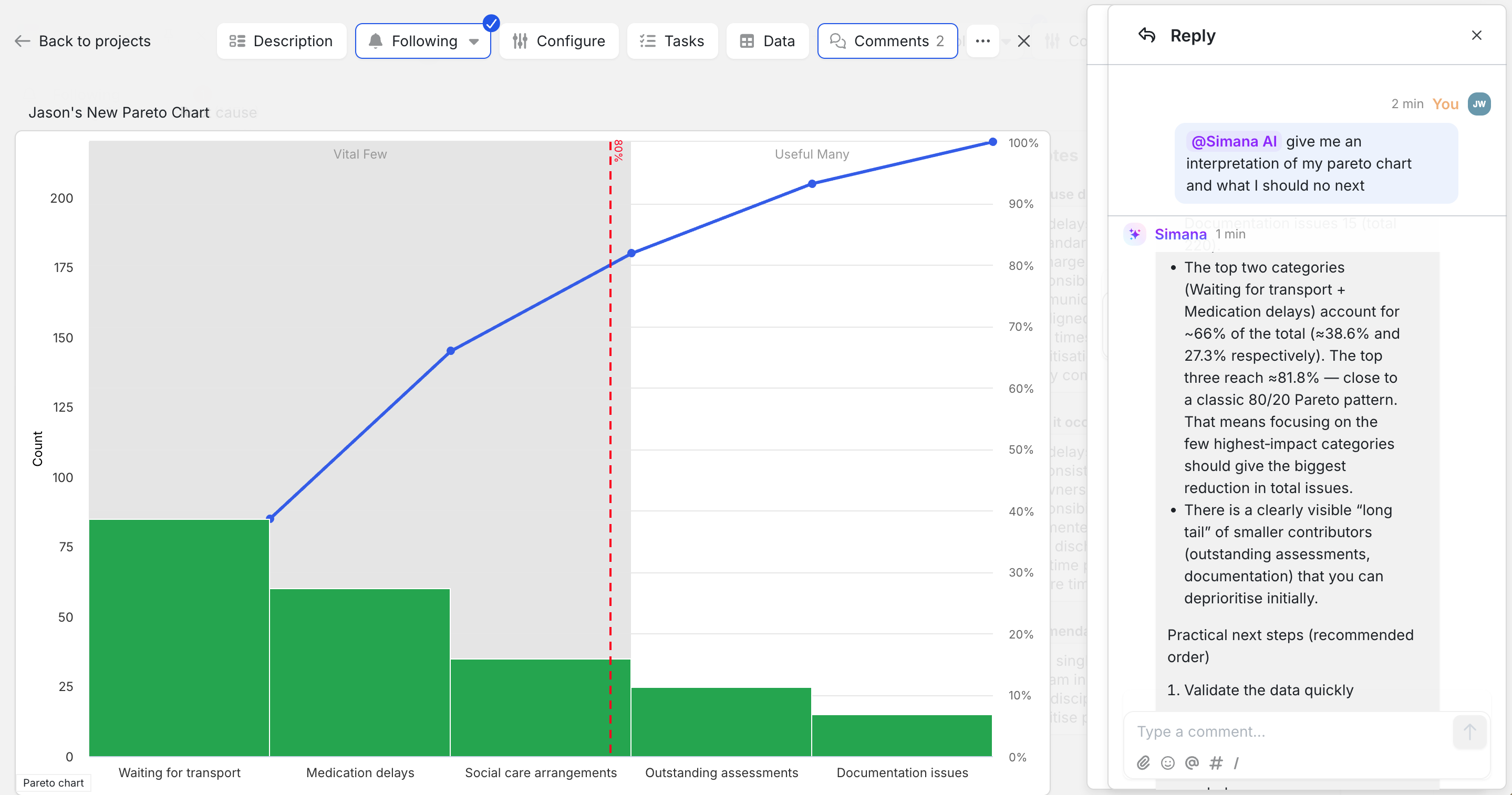 Simana screenshot showing Simana AI's analysis of the Pareto chart.
Teams can ask questions such as:
- What does this Pareto chart tell us?
- Which causes should we investigate first?
- What improvement opportunities does this suggest?
- What additional data should we collect?
- What questions should we ask next?
- What change ideas might be worth testing?
Rather than simply describing the chart, Simana AI helps teams think through the implications of the analysis and identify practical next steps.
Importantly, the goal is not to replace local knowledge or professional judgement. The people closest to the work remain best placed to understand the context behind the data. Instead, Simana AI provides additional support by helping teams interpret evidence, explore improvement opportunities, and apply proven improvement thinking to their decision-making.
For organisations with limited access to improvement expertise, this can help build confidence and make improvement methods more accessible to a wider range of teams.
Moving from Insight to Action
Identifying priorities is only the first step.
Once a team understands where the largest opportunities for improvement exist, they can begin investigating the causes in more detail and developing change ideas.
Because Pareto analysis sits alongside other forms of root cause analysis within an improvement project, teams can easily evaluate the results as part of comprehensive root cause analysis and make informed decisions about next steps. Other root cause analysis tools available in Simana include: Fishbone diagram and 5 Whys, with Process Maps coming soon!
Teams can use the appropriate set of tools and then summarise their findings and next steps all in one place within their project. Check out the screenshot below for how this might look in a Simana project...
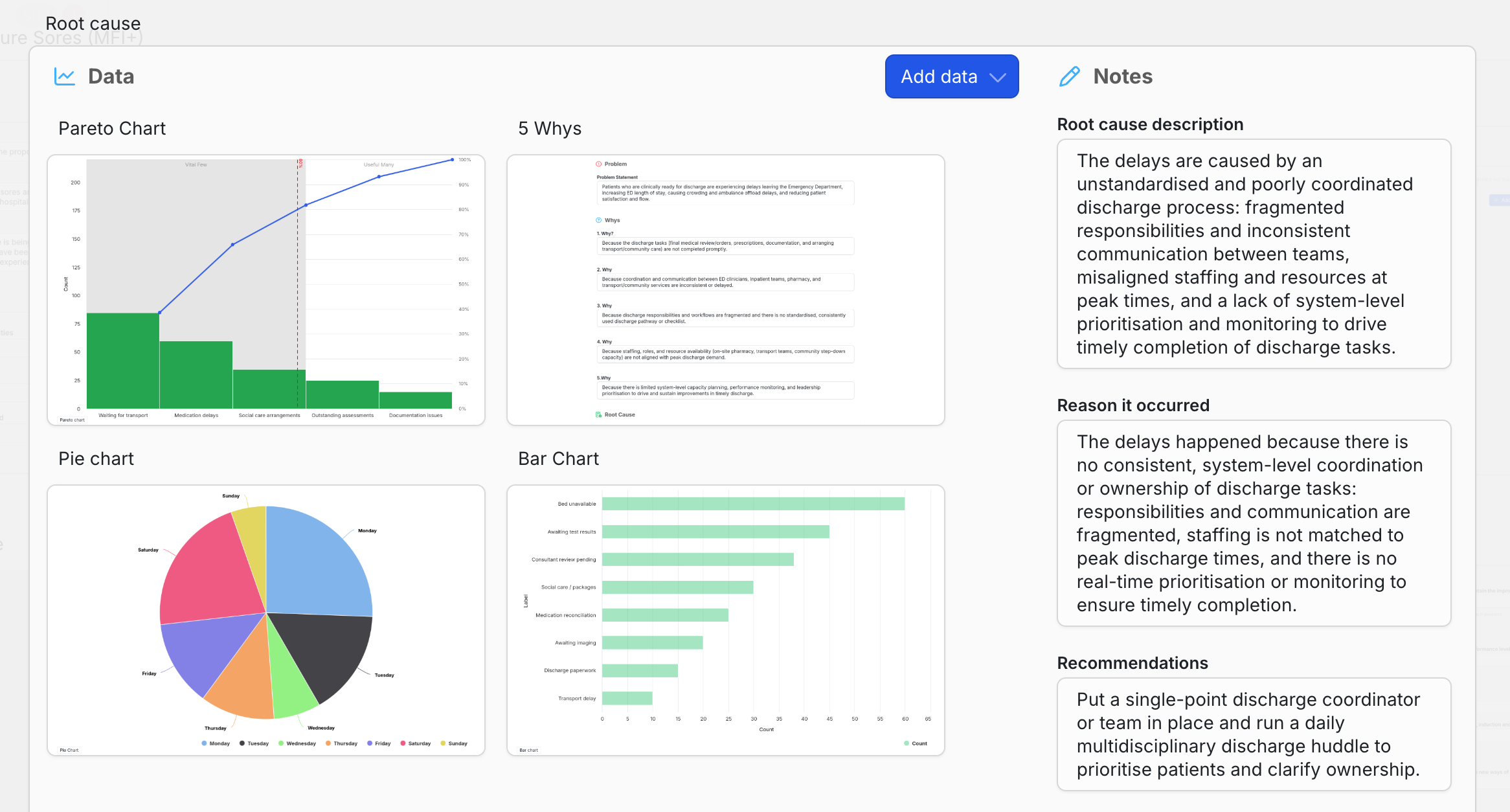 Simana screenshot showing the Root Cause section of a project.
This helps ensure that insight is translated into action rather than remaining as a standalone analysis exercise.
Supporting Collaboration and Shared Understanding
One of the strengths of Pareto charts is that they provide a simple visual representation of complex information. Because charts can be viewed and discussed by the wider improvement team, they can help create a shared understanding of priorities.
Every chart in Simana includes a dedicated comments thread, allowing project teams, central improvement support teams, and Simana AI to all collaborate together directly around the evidence. Questions, observations, interpretations, and decisions remain connected to the chart itself, creating a shared understanding of what the data is saying and what should happen next.
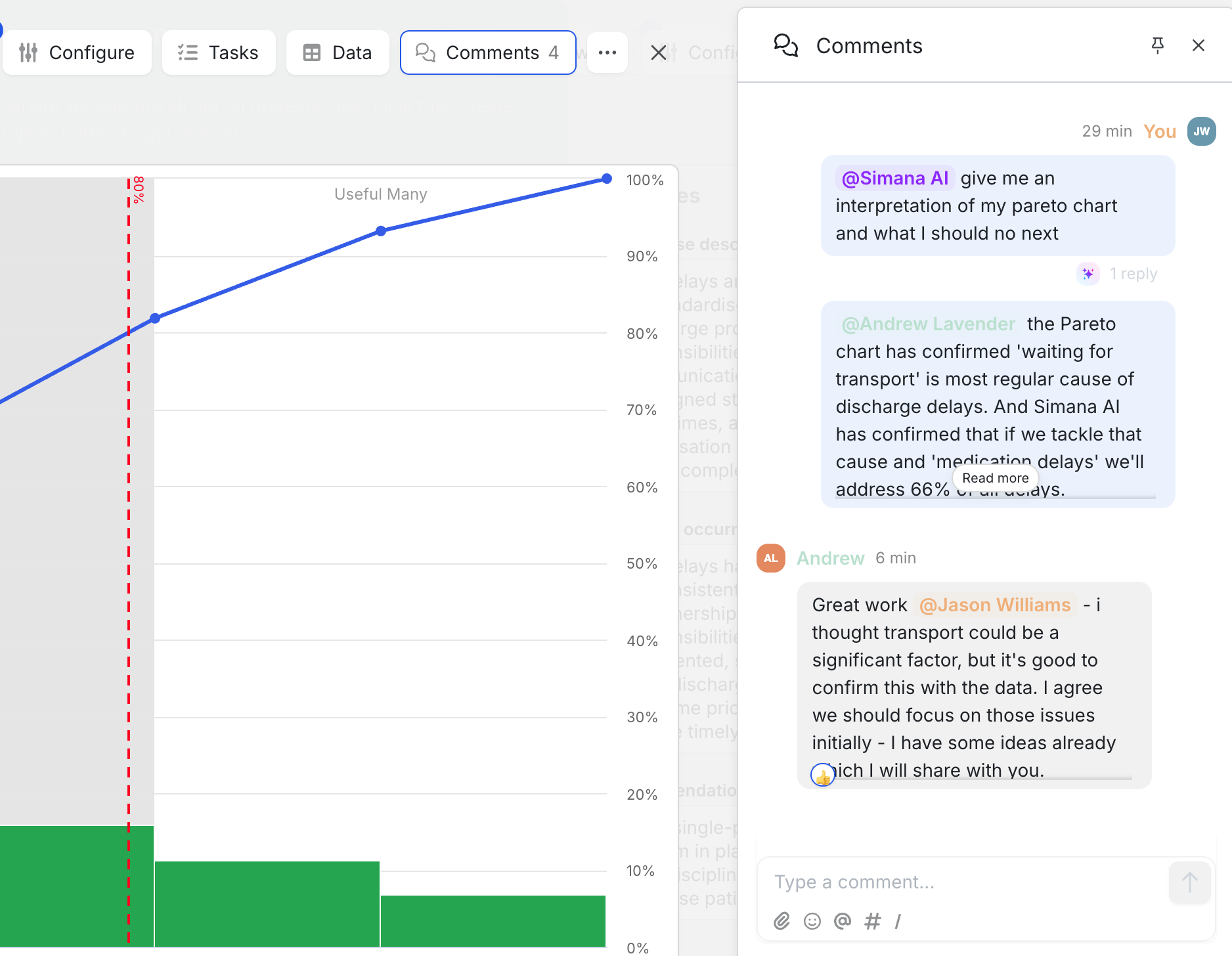 Simana screenshot showing team collaboration and Simana AI input.
By combining human expertise, local knowledge, and AI-powered improvement guidance in a single workspace, Simana helps teams move more quickly from analysis to action. Rather than acting as a repository for projects or a place to store charts, Simana becomes an active environment where improvement work happens.
Not a project management tool. Not a reporting tool. A collaborative improvement workspace.
Bringing Analysis and Improvement Together
Pareto charts are a powerful way to identify the causes that contribute most to a problem. But the greatest value comes when that insight leads to action.
By enabling teams to create, share, and use Pareto charts within the context of their improvement work, Simana helps organisations move more easily from understanding a problem to improving it.
Whether the goal is reducing delays, improving patient experience, strengthening safety, or improving operational performance, Pareto analysis can help teams focus effort where it is most likely to make a difference.
Why not get started with Simana today and give it a go!